
The AI world has a noise problem.
Every day there’s a new “revolutionary” app promising to save 20 hours a week, replace your team, and magically grow your business overnight.
Most of them are forgettable. But a few AI tools genuinely make work easier, faster, and less mentally exhausting.
After testing dozens of tools over the past year, these are the AI apps I keep coming back to in 2026 — not because they’re trendy, but because they’re useful.
This isn’t a giant list of 100 random tools.
Just the AI apps that actually deserve a spot in your workflow.
1. OpenAI — The AI Tool Most People Will Use Daily
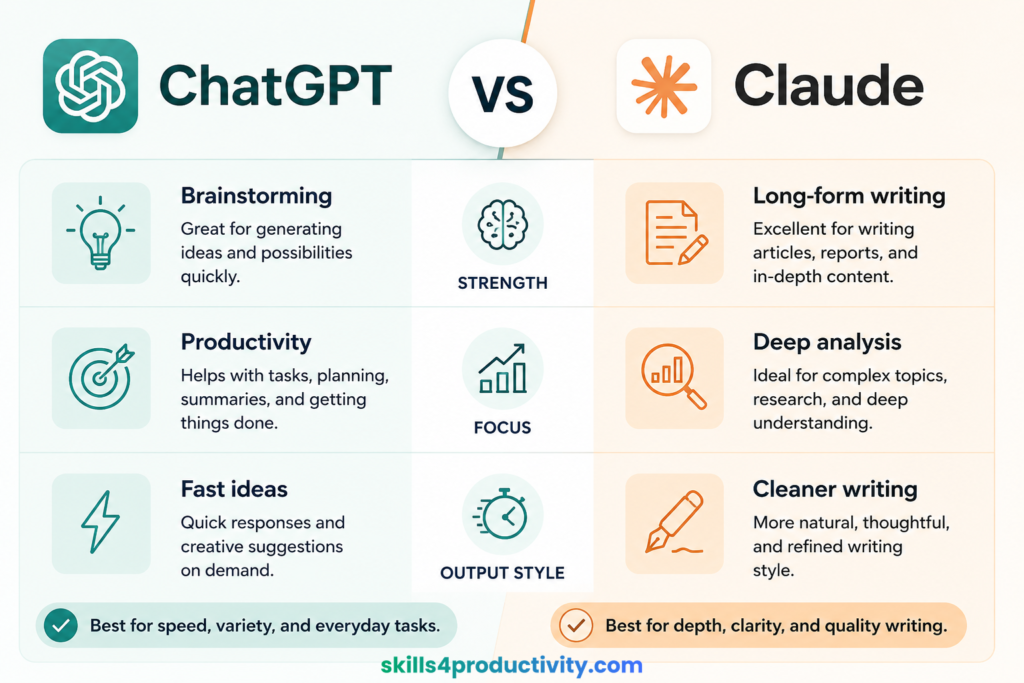
At this point, ChatGPT feels less like a tool and more like a second brain. I use it almost every day for:
- brainstorming article ideas
- outlining content
- summarizing research
- rewriting messy notes
- planning projects
- learning faster
The biggest mistake people make with ChatGPT is using it only for quick prompts.
The real value comes when you use it as a thinking partner.
Instead of asking: Write me a Blog Post.
Try:
- “Help me simplify this idea.”
- “Give me 3 stronger angles.”
- “What am I missing here?”
- “Turn these rough notes into a structure.”
That’s where it becomes incredibly useful.
Best for creators, students, marketers, founders, writers and productivity workflows.
2. Anthropic — Surprisingly Good for Writing
Claude feels calmer than most AI tools.
That sounds strange, but if you’ve used different AI assistants, you probably know what I mean.
Its writing style is usually cleaner, more natural, and less robotic than many alternatives.
I especially like it for:
- long-form writing
- editing drafts
- summarizing PDFs
- strategy documents
- deep research
It also handles large amounts of text really well, which makes it useful when working with reports, transcripts, or long notes.
If ChatGPT feels like an all-purpose assistant, Claude feels more like an editor.
3. Perplexity AI — Better Than Traditional Search for Research
Google still works.
But for research-heavy work, Perplexity is often faster.
Instead of opening 10 tabs and digging through articles, you can ask one question and get:
- summarized answers
- sources
- comparisons
- follow-up suggestions
It’s especially helpful for market research, product comparisons, fact-checking and quick learning sessions.
I’ve found myself using it more whenever I need answers quickly without getting lost in search results.
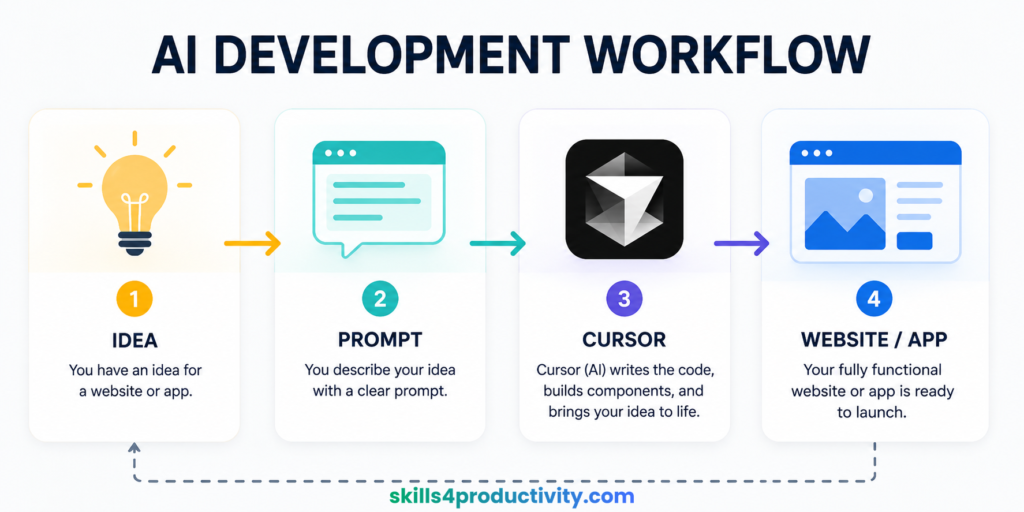
4. Cursor — The AI Coding Tool That Changed Everything
Cursor is one of those tools that makes you realize software development is changing fast.
Even people with limited coding experience can now:
- build small tools
- fix bugs
- create websites
- launch MVPs faster
What makes Cursor different is how naturally AI is built into the editor.
You can literally highlight code and ask:
- “Why is this breaking?”
- “Clean this up.”
- “Make this mobile responsive.”
- “Explain this like I’m a beginner.”
For creators and startup founders, that’s incredibly powerful.
5. Canva — Still the Easiest Design Tool on the Internet
A lot of AI design tools look impressive in demos.
Canva is the one people actually keep using.
Why?
Because it removes friction.
You can quickly create:
- social media graphics
- blog images
- presentations
- ebooks
- YouTube thumbnails
- PDFs
- lead magnets
And now the AI features make the process even faster.
Magic Resize, AI image generation, presentation tools, and text features save a ridiculous amount of time.
For creators and small business owners, Canva is still one of the best value tools online.
6. Descript — Editing Video Like a Google Doc
Traditional video editing can feel overwhelming.
Descript makes it feel approachable.
Instead of editing timelines endlessly, you edit the transcript.
Delete a sentence from the text → it disappears from the video.
Simple.
It’s great for:
- YouTube videos
- podcasts
- interviews
- screen recordings
- online courses
The AI voice cleanup tools are also surprisingly good.
If you create content regularly, Descript can easily save hours every week.
7. Notion + AI — My Favorite Knowledge System
Notion became much more useful once AI was integrated properly.
I mainly use it for:
- organizing ideas
- content planning
- saving research
- project management
- SOPs and workflows
The AI features help speed things up without taking over the experience.
That balance matters.
Some apps try too hard to automate everything.
Notion still feels like a workspace first — AI second.
And honestly, that’s why it works.
8. Runway — The Most Impressive AI Video Tool Right Now
AI video generation still feels a bit surreal.
And Runway is leading a lot of that innovation.
You can create:
- cinematic clips
- animations
- AI-generated scenes
- visual effects
- short-form video content
It’s not perfect yet.
But compared to where AI video tools were even a year ago, the progress is wild.
For creators, marketers, and filmmakers, this category is worth paying attention to.
9. Zapier — The Tool That Quietly Saves Hours
Zapier isn’t flashy.
But it might save more time than almost any other tool on this list.
You can automate repetitive tasks like:
- sending form responses
- moving data between apps
- creating tasks automatically
- publishing content workflows
- email notifications
The best automations are usually boring.
But boring systems save energy.
And that’s what makes Zapier valuable.
10. Google — The Most Underrated AI Tool Right Now
NotebookLM feels like a research assistant built for serious learners.
You upload your own sources — PDFs, notes, documents, transcripts — and then interact with them using AI.
That changes everything.
Instead of generic internet answers, you’re working with your own material.
It’s incredibly useful for:
- studying
- research
- writing projects
- course notes
- book summaries
This is one of those tools that people try once and suddenly start using constantly.
The Real Secret: Don’t Build a Giant AI Stack
Most people don’t need 25 AI apps. They just need:
- one good writing tool
- one research tool
- one automation tool
- one organization system
That’s enough to massively improve productivity.
The people getting the best results with AI usually aren’t using the most tools.
They’re just using a few tools consistently.
A Simple AI Stack That Actually Makes Sense
If you’re overwhelmed, start here:
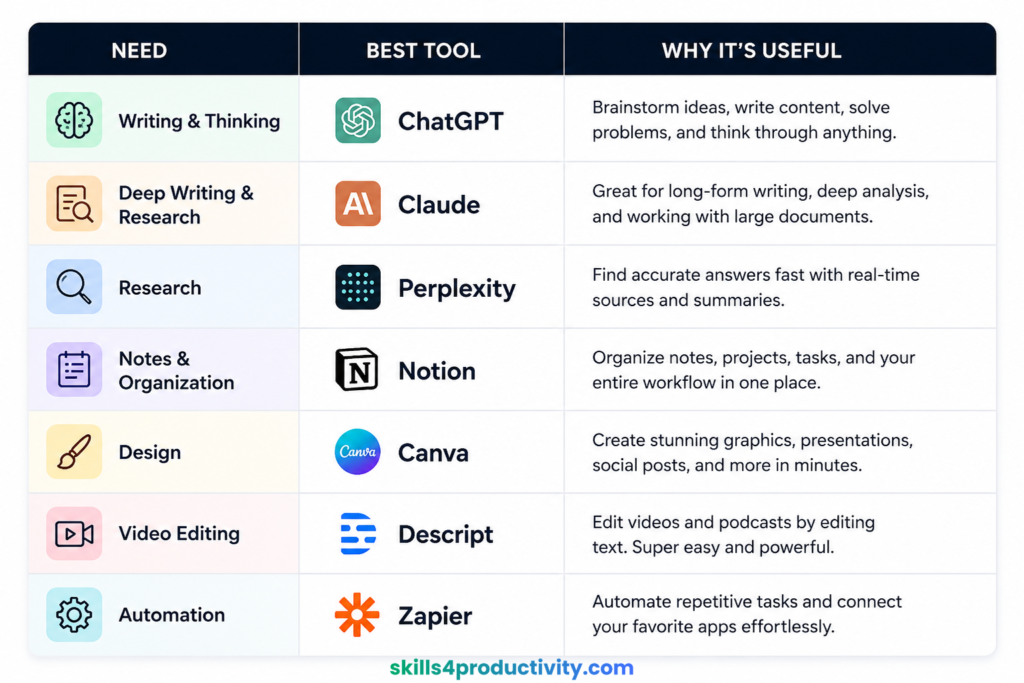
Simple. Practical.
And more than enough for most people.
Final Thoughts
AI in 2026 feels very different from the early hype cycle.
The shiny-tool phase is fading.
Now people care about:
- saving time
- reducing mental overload
- creating faster
- working smarter
The best AI apps aren’t necessarily the most advanced.
They’re the ones that quietly become part of your everyday workflow.
And once that happens, it’s hard to imagine working without them.
Frequently Asked Questions
What is the best AI app in 2026?
ChatGPT remains one of the best all-around AI apps for writing, productivity, brainstorming, and learning.
Is ChatGPT still the best AI tool?
Yes. ChatGPT is still one of the most useful AI tools because it works well for multiple tasks including writing, research, and planning.
Which AI tool is best for productivity?
Popular AI productivity tools include ChatGPT, Notion AI, Zapier, Grammarly, and Superhuman.
What AI apps do content creators use?
Many creators use ChatGPT, Canva, Descript, Runway, and Notion for content creation and workflow management.
Which AI tool is best for students?
Students often use ChatGPT, NotebookLM, Perplexity, Grammarly, and Notion for studying and research.
Are AI productivity tools worth paying for?
Yes, if they save time and improve workflow. Most people only need a few good AI tools rather than many subscriptions.
Disclosure: This article may contain affiliate links. If you purchase through these links, Skills4Productivity may earn a commission at no additional cost to you.