
How to Write Better AI Prompts, Understand Prompt Frameworks & Actually Get Useful Results
Most people use AI tools the wrong way.
They open ChatGPT, type a quick sentence like “write a blog post about productivity,” and expect something brilliant to appear instantly. Sometimes the response is decent. Most of the time, though, the output feels generic, repetitive, or strangely robotic.
That usually isn’t the AI’s fault.
The problem is the prompt.
Over the past few years, tools like ChatGPT, Claude, Gemini, and Copilot have become part of everyday work. Students use them to study, marketers use them to brainstorm campaigns, professionals use them to write emails, and creators use them to generate ideas faster.
But there’s a huge difference between casually using AI and knowing how to communicate with it effectively.
That’s where prompt engineering comes in.
Despite the technical-sounding name, prompt engineering is not just for programmers or AI researchers. In reality, it’s simply the skill of giving AI better instructions.
And honestly, most people overcomplicate it.
You don’t need to memorize complicated formulas or learn advanced coding techniques to write good prompts. You just need to learn how to communicate clearly, provide context, and guide the AI toward the kind of response you actually want.
Once you understand that, AI tools become dramatically more useful.
You stop getting vague answers. You stop wasting time rewriting outputs. And you start using AI like a productivity tool instead of a novelty.
In this guide, we’ll break down:
- what prompt engineering actually means
- how prompts work
- the best prompt frameworks
- common mistakes people make
- advanced prompting techniques
- practical productivity examples
- how to improve your prompting skills over time
This article is designed for beginners, creators, students, professionals, and anyone who wants to use AI more effectively in real life.
If you’re completely new to AI tools, you can also explore our ChatGPT Masterclass course summary.
What Is Prompt Engineering?
Prompt engineering is the process of writing instructions that help AI tools generate better responses.
That’s really all it is.
A prompt can be simple: “Summarize this article.”
Or it can be detailed: “Act as a productivity coach and create a beginner-friendly morning routine for remote workers who struggle with distractions. Keep the tone practical and motivating.”
The more helpful context you provide, the more useful the output tends to become.
One of the biggest misconceptions about AI is that it “thinks” like a human. It doesn’t. AI models predict patterns based on the information they receive. If the instructions are unclear, the output often becomes unclear too.
A good way to think about prompting is this: Using AI without context is like hiring a highly skilled assistant and giving them incomplete instructions.
Imagine telling someone: “Make a presentation.”
They would immediately have questions.
What topic? Who is the audience? How long should it be? What tone should it have? What’s the goal?
AI works similarly.
The quality of your instructions directly influences the quality of the response.
And that’s why prompt engineering has become such an important skill.
People who know how to prompt well often save hours of work every week.
Why Prompt Engineering Matters
The interesting thing about AI is that most people are still using maybe 10–20% of what these tools can actually do.
They use ChatGPT like a search engine.
But AI becomes far more powerful once you start treating it like a collaborative assistant.
For example, instead of asking: “Give me productivity tips.”
You could ask: “Act as a productivity coach for remote workers. Create a realistic weekly system for someone who gets distracted easily, struggles with procrastination, and works from home full-time.”
That one change completely transforms the output.
Prompt engineering matters because it improves:
- clarity
- relevance
- structure
- creativity
- usefulness
- consistency
And in a world where AI is becoming integrated into everyday workflows, this skill has real value.
Writers use prompting to brainstorm ideas. Marketers use it to create campaigns. Students use it to learn faster. Developers use it for debugging. Entrepreneurs use it for research.
Even people who aren’t deeply interested in AI are starting to realize that better prompting leads to better productivity.
In many ways, prompting is becoming a modern communication skill.
How AI Prompts Actually Work
Most AI tools work by predicting patterns in language.
When you type a prompt into ChatGPT or Claude, the model analyzes your words, identifies context, and tries to generate the most statistically relevant response.
This is why vague prompts usually produce generic outputs.
If you type: “Write about leadership.”
The AI has very little direction.
But if you type: “Write a beginner-friendly article explaining leadership lessons from sports coaches. Use practical examples and a conversational tone.”
Now the AI has:
- a topic
- an audience
- a tone
- a structure
- a direction
The response becomes far more focused.
This is also why context matters so much.
The best prompts usually include:
- who the AI should act as
- what task it should perform
- background information
- constraints or requirements
- output formatting instructions
Prompting is less about tricks and more about clarity.
A lot of prompt engineering advice online makes things sound overly technical. But the truth is that most people simply need to learn how to explain what they want more clearly.
That alone improves results dramatically.
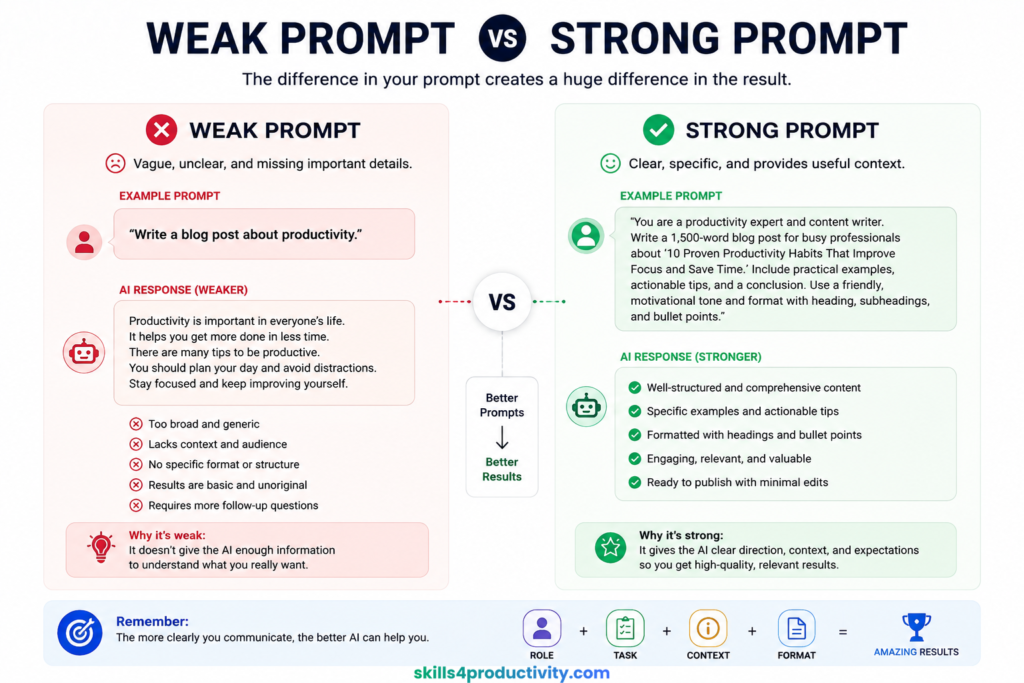
Weak Prompts vs Strong Prompts
One of the fastest ways to improve your AI results is learning the difference between weak prompts and strong prompts.
Here’s a weak prompt: “Write about productivity.”
There’s almost no direction there.
The AI doesn’t know:
- who the audience is
- what type of productivity
- how long the article should be
- what tone to use
- what outcome you want
Now compare that with this: “Act as a productivity coach. Write a beginner-friendly article explaining the Pomodoro Technique for remote workers. Include practical examples, common mistakes, and a simple step-by-step implementation guide.”
That prompt immediately gives the AI:
- a role
- a target audience
- a specific topic
- formatting direction
- a clear goal
And the output quality usually improves significantly.
When I first started experimenting with AI tools, I made the same mistake most people make: I assumed the AI would automatically understand what I wanted.
It doesn’t.
Once I started adding context and clearer instructions, the difference was obvious.
The outputs became more practical, more natural, and much closer to something I could actually publish or use.
The Best Prompt Frameworks
This is where prompting becomes much easier.
A good framework gives structure to your instructions so you don’t have to reinvent prompts every time.
You don’t need to follow frameworks rigidly, but they help organize your thinking and consistently improve outputs.
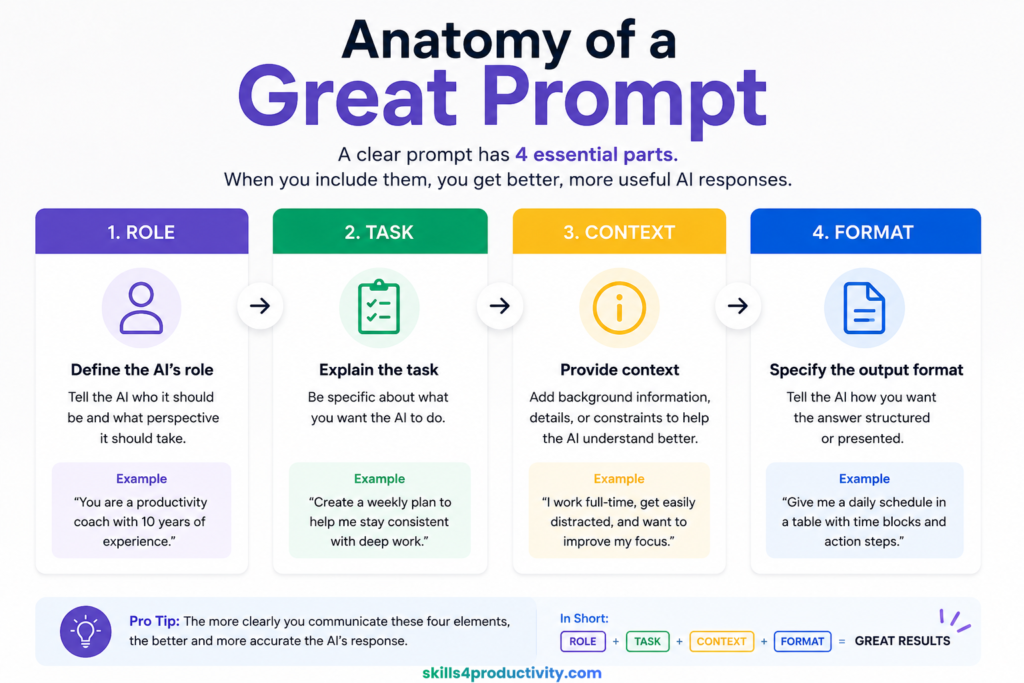
1. Role – Task – Context – Format
This is probably the best framework for beginners because it’s simple and practical.
You define:
- the role
- the task
- the context
- the output format
For example: “Act as a career coach. Help me prepare for a software engineering interview. I have two years of experience and struggle with behavioral questions. Give me a list of common interview questions with sample answers in table format.”
This framework works well because it mirrors how humans naturally communicate.
You’re giving the AI a clear identity, a goal, background information, and formatting expectations.
It’s especially useful for:
- productivity workflows
- learning tasks
- business writing
- career preparation
- content creation
2. RACE Framework
Another popular prompting framework is RACE:
- Role
- Action
- Context
- Expectation
It’s similar to the previous framework but slightly more outcome-focused.
Example: “Act as a learning strategist. Create a 30-day beginner roadmap for learning prompt engineering. I can study one hour daily. Include practical exercises and free resources.”
The reason frameworks like this work well is because AI tools perform better when they understand the desired outcome clearly.
Without direction, AI tends to fill gaps with generic information.
With direction, it becomes far more targeted.
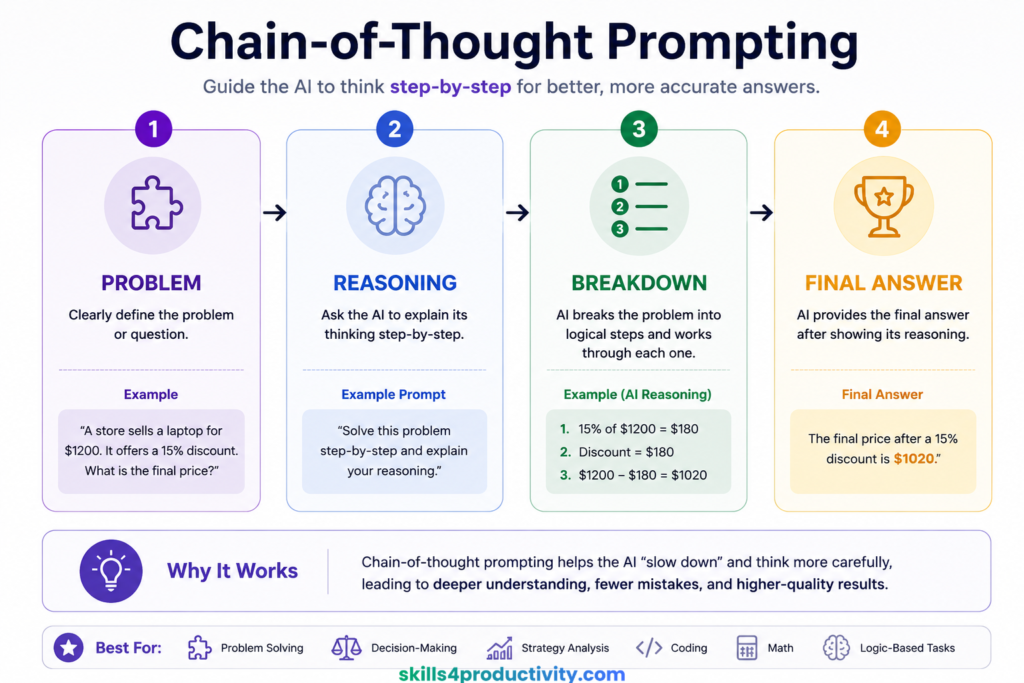
3. Chain-of-Thought Prompting
Chain-of-thought prompting encourages AI to reason through problems step by step.
Instead of immediately generating an answer, you ask the model to explain its reasoning process.
For example: “Solve this problem step-by-step and explain your reasoning before giving the final answer.”
This technique is especially useful for:
- problem solving
- decision-making
- strategy analysis
- coding
- math
- logic-based tasks
One interesting thing about chain-of-thought prompting is that it often improves answer quality because the AI “slows down” and processes the task more systematically.
4. Few-Shot Prompting
Few-shot prompting means giving the AI examples before asking it to perform a task.
This technique is incredibly useful when you want consistent tone or formatting.
For example, if you want AI to generate blog headlines, you could first provide two or three examples of the style you like.
The AI then uses those examples as references.
This works surprisingly well.
In fact, many people underestimate how powerful examples can be.
Sometimes a single example improves output quality more than writing a longer instruction.
5. Persona Prompting
Persona prompting involves assigning the AI a role or perspective.
For example:
- “Act as a productivity coach.”
- “Act as a startup advisor.”
- “Act as a university professor.”
- “Act as a professional editor.”
This changes the tone, depth, and style of the response.
Interestingly, persona prompting also makes conversations feel more natural because the AI starts responding within a clearer context.
That said, the role alone is not enough.
You still need to explain what you want.
A common beginner mistake is writing: “Act as a marketing expert.”
And then stopping there.
The AI still needs a task.
Best Prompting Techniques for Productivity
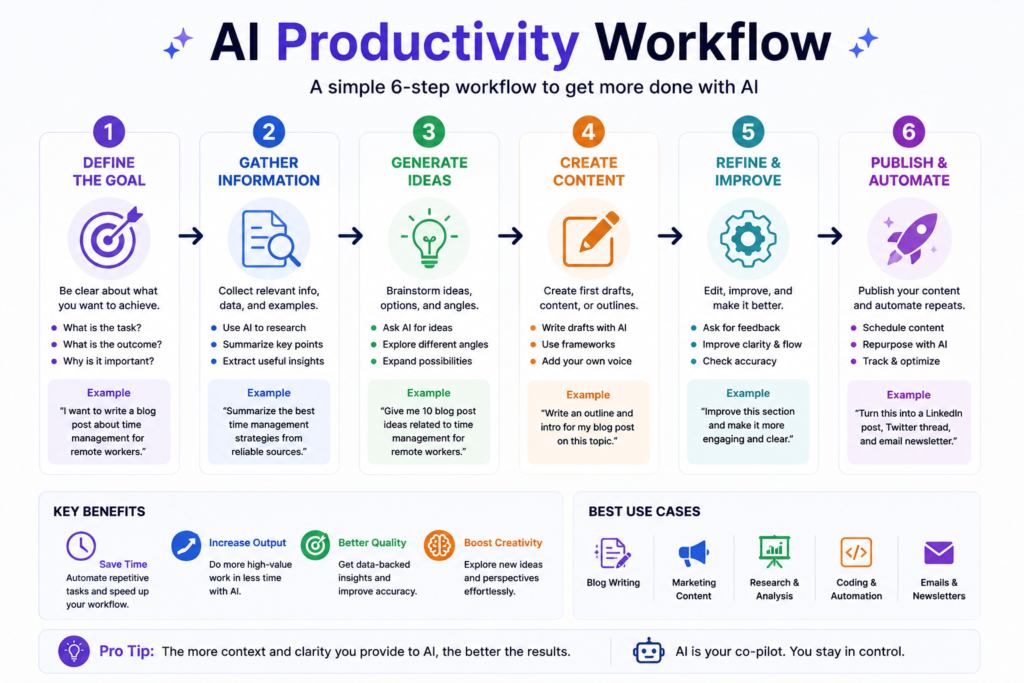
One of the most practical uses of prompting is improving productivity.
AI tools are incredibly useful when you stop asking random questions and start designing workflows.
For example, instead of asking: “How do I become more productive?”
You could ask: “Create a realistic weekly productivity system for a remote worker who struggles with distractions and context switching.”
That level of specificity changes everything.
Another underrated technique is iterative prompting.
Most people expect perfect results from the first prompt.
That rarely happens.
The best prompting usually happens through refinement.
You generate an initial response, then improve it through follow-up instructions:
- simplify this
- make it more concise
- add examples
- rewrite this in a conversational tone
- expand section three
- create a table version
Think of AI prompting more like collaboration than command execution.
You guide the system gradually.
That’s often where the best outputs come from.
Common Prompt Engineering Mistakes
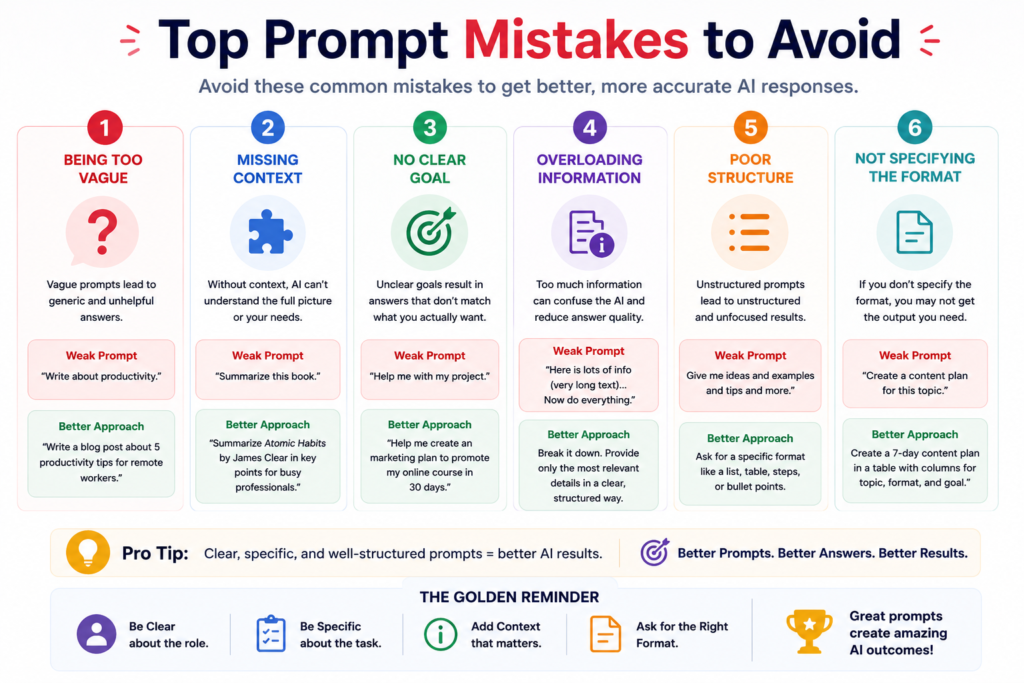
Most beginners make the same few mistakes.
The first is being too vague.
AI tools need direction.
A prompt like: “Write about AI.”
Usually produces generic content because the request itself is generic.
Another common mistake is asking too many things at once.
People often create giant prompts with multiple unrelated tasks packed together.
That usually confuses the output.
Breaking large tasks into smaller steps often works much better.
Another issue is ignoring audience context.
A response written for beginners should sound very different from a response written for technical professionals.
And finally, many people expect perfect outputs instantly.
Prompting is iterative.
Even experienced users refine prompts constantly.
The goal is not perfection on the first try.
The goal is progressively improving the output.
Advanced Prompt Engineering Techniques
Once you become comfortable with basic prompting, you can start experimenting with more advanced workflows.
One useful method is prompt chaining.
Instead of using one massive prompt, you split the workflow into stages.
For example:
- Generate ideas
- Create an outline
- Expand sections
- Improve readability
- Rewrite for tone
- Create social media summaries
This workflow often produces far better results than trying to do everything in a single prompt.
Another interesting technique is self-critique prompting.
You can ask AI to evaluate its own output.
For example: “Review your previous answer and identify weaknesses or missing details.”
This often improves quality surprisingly well.
You can also use comparative prompting: “Compare three productivity systems for freelancers.”
Or perspective prompting: “Analyze this business idea from the perspective of a marketer, investor, and customer.”
These approaches make AI outputs far more nuanced and useful.
Best AI Tools for Prompt Engineering
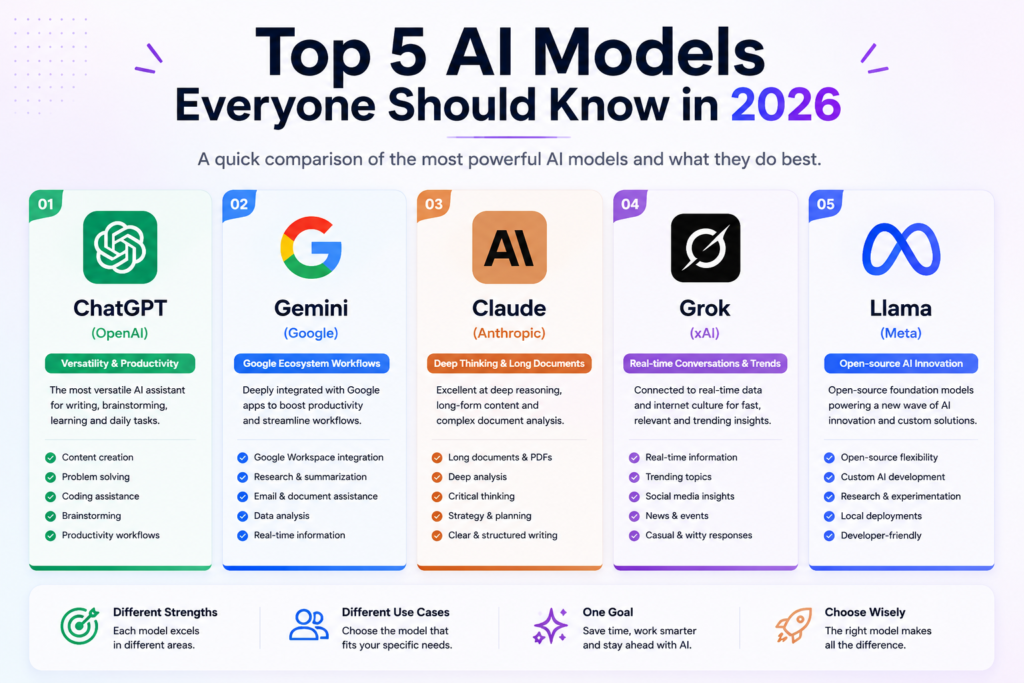
Different AI tools have different strengths.
ChatGPT is excellent for general-purpose prompting and productivity tasks. Claude is particularly strong for long-form writing and analysis. Gemini integrates well with the Google ecosystem. Copilot works well inside Microsoft workflows. Perplexity is useful for research-focused tasks.
The reality is that no single AI tool is perfect.
Many people eventually use multiple tools depending on the workflow.
For example, someone might use:
- ChatGPT for brainstorming
- Claude for writing
- Perplexity for research
- Copilot for workplace integration
The best approach is experimenting and discovering which workflows fit your needs.
Recommended Prompt Engineering Courses
If you want to improve faster, structured learning can help.
There are now dozens of AI and prompt engineering courses online, but a few stand out because they focus on practical workflows instead of overwhelming technical theory.
1. ChatGPT Masterclass: ChatGPT Guide for Beginners to Experts
Best for beginners learning practical prompting.
2. Prompt Engineering for ChatGPT — Course Summary
Best for understanding structured prompting methods.
3. Google Prompting Essentials Specialization
Best for workplace AI usage and productivity.
4. AI Fundamentals with Claude
Best for understanding Claude workflows.
5. ChatGPT for Business & Marketing Content
Best for marketers and creators.
6. Top Ten AI Prompts (LinkedIn Learning)
Best for quick prompt inspiration.
How to Improve Your Prompt Engineering Skills
The best way to improve prompting is simple: Practice.
There’s no shortcut around this.
People often spend hours reading prompt tips online but rarely experiment consistently.
In reality, prompt engineering improves through repetition.
You start noticing patterns.
You learn which instructions improve clarity. You learn when examples help. You learn how much context is too much.
One useful habit is saving successful prompts.
Create your own prompt library.
Over time, you’ll build reusable templates for:
- writing
- research
- brainstorming
- productivity
- career planning
- learning
- content creation
This becomes incredibly valuable.
Many advanced AI users are not necessarily “better” at prompting because they know secret techniques.
They’re better because they’ve experimented more.
The Future of Prompt Engineering
Prompting is still evolving quickly.
Right now, most people interact with AI through text.
But that’s already starting to change.
Voice prompting, multimodal AI, AI agents, and workflow automation are becoming increasingly common.
In the future, prompting may become less about writing individual instructions and more about designing systems.
Instead of asking AI to complete isolated tasks, people will build entire workflows around AI assistants.
And honestly, we’re still very early.
Most people haven’t fully integrated AI into their daily productivity systems yet.
That’s why learning prompting today can be such a valuable long-term skill.

Final Thoughts
Prompt engineering sounds technical, but at its core, it’s really about communication.
The better you become at explaining what you want, the better AI tools become at helping you.
You don’t need perfect prompts. You don’t need advanced jargon. And you definitely don’t need to memorize complicated frameworks.
What matters most is clarity.
The people getting the best results from AI are usually the people who:
- provide context
- think clearly
- refine outputs
- experiment consistently
- communicate effectively
That’s the real skill.
And as AI tools continue becoming part of everyday work, learning how to prompt effectively will likely become just as important as learning how to search the internet or use productivity software.
The good news is that anyone can improve.
And the fastest way to start is simple: Open your favorite AI tool, stop writing vague prompts, and start giving better instructions.
You’ll notice the difference almost immediately.
FAQ
What is prompt engineering?
Prompt engineering is the process of writing better instructions for AI tools like ChatGPT, Claude, and Gemini to improve the quality of responses.
Is prompt engineering difficult to learn?
Not really. Most people can improve dramatically just by learning how to provide clearer instructions and better context.
Which AI tool is best for prompting?
ChatGPT, Claude, Gemini, and Copilot are all strong options. The best tool depends on your workflow and use case.
What are the best prompt frameworks?
Popular frameworks include:
- Role–Task–Context–Format
- RACE
- Chain-of-Thought prompting
- Few-shot prompting
- Persona prompting
Can prompt engineering improve productivity?
Yes. Better prompts help generate more accurate, useful, and structured responses, which saves time and improves workflows.
Do I need technical knowledge to learn prompting?
No. Prompt engineering is largely about communication and clarity rather than coding.
Disclosure: This article may contain affiliate links. If you purchase through these links, Skills4Productivity may earn a commission at no additional cost to you.